How to use it, in practice
Already installed and started the agent? Then you are almost there. With a few taps in Telegram it starts working for you. Here is the best way to use it.
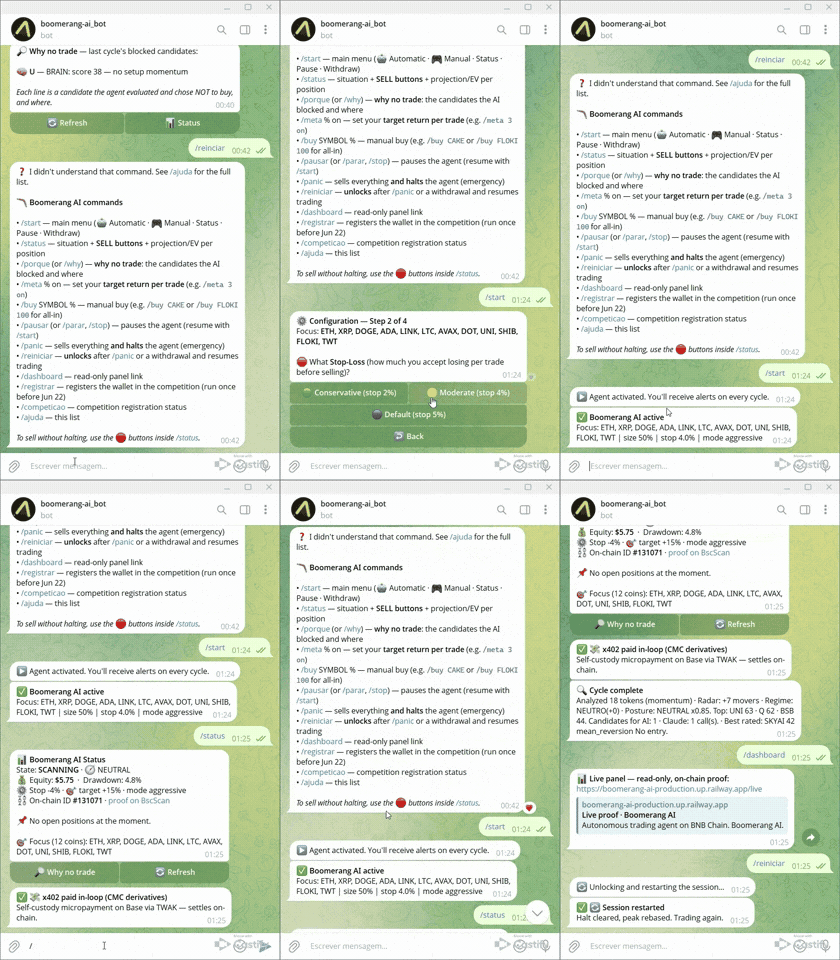
Open the bot and send /start
In Telegram, find your bot and send /start. The menu appears with everything you can do. Only you can command it.
Configure in 3 choices
Tap Configure and choose: the coin (or "All liquid"), the stop-loss (how much you accept losing) and the take-profit (when to realize the gain). It takes about 30 seconds.
Activate
Tap Activate. That is it: the agent starts watching the market and trading on its own, following exactly the rules you set.
Follow along
You get a message on every action, with the reason and the result. Want to check anytime? Send /status for the live summary, or /dashboard to open the visual panel.
Stay in control
Change your mind anytime: /pause to pause, Withdraw All to send the money back to your wallet, and /panic to exit everything at once in an emergency.
Golden tips
Small habits that make a difference in getting the best from the agent.
Start small
Use a test bankroll. You learn how the agent behaves without risking much.
Let it choose
When in doubt, select "All liquid". The agent focuses on the best opportunity of the moment on its own.
Keep it running
The longer it stays active, the more opportunities it catches. It works 24 hours; you do not have to.
Read the alerts
Each message tells you what it did and why. It is the best way to understand and trust it.
Not installed yet? The full step by step, including how to create and fund the wallet, is in the Docs.